
Updated on Jul. 22, 2026
Position: Resource - Partition Management - Create Bootable USB for Recovery: DiskGenius – Your Ultimate PC Rescue Tool
When your Windows computer crashes, fails to boot, or suffers data loss due to viruses, accidental deletion, or system updates gone wrong, a bootable USB for recovery is your most reliable lifeline. Without it, you may face hours of tedious system reinstallation, permanent data loss, or costly professional repairs. DiskGenius, a leading all-in-one disk utility, simplifies creating a professional WinPE bootable USB with just a few clicks—no advanced technical skills required. In this article, we explore why a recovery USB is essential, how DiskGenius makes creation effortless, and why it stands out as the top choice for users in 2026.
A bootable recovery USB is a portable, lightweight tool that lets you boot an unresponsive PC and perform critical repairs, data recovery, and system maintenance—without loading the installed Windows OS. It addresses the most common and stressful PC emergencies:
• System Boot Failure: Corrupted system files, faulty updates, or blue-screen errors prevent Windows from starting.
• Data Loss Disasters: Accidental deletion, formatting, ransomware attacks, or RAW partitions block access to important files, photos, and documents.
• Partition Corruption: Lost, deleted, or damaged partitions make hard drives unrecognizable, endangering all stored data.
• OS Migration & Upgrades: Moving Windows to a new SSD or replacing a failing HDD requires offline tools to avoid data risks.
While Windows offers a built-in recovery drive tool, it has critical limitations: it demands large USB storage, often fails with modern UEFI systems, and lacks advanced data recovery or partition management features. Third-party tools like Rufus focus solely on OS installation, while others bundle bloatware or charge high fees for basic recovery functions. DiskGenius eliminates these pain points by combining one-click bootable USB creation, powerful recovery tools, and comprehensive system maintenance in a single, clean application.
DiskGenius is a trusted professional disk utility used by millions worldwide. Unlike single-function tools, it integrates partition management, data recovery, backup & restore, disk cloning, and bootable USB creation into one lightweight app. Its standout feature is the ability to create a WinPE-based bootable USB for recovery preloaded with the full DiskGenius toolkit—enabling you to fix almost any disk or system issue directly from the USB.
Key Advantages of DiskGenius Bootable USB
1. One-Click Creation (No USB Formatting Required)
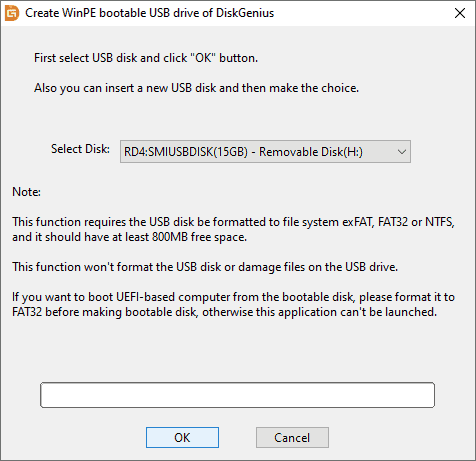
Most recovery USB tools force formatting, erasing all existing data on the USB. DiskGenius lets you create a bootable USB without formatting or deleting your files—perfect for repurposing your daily-use USB drive. It only requires 800MB+ free space and supports exFAT, FAT32, or NTFS file systems.
2. Full UEFI & Legacy BIOS Compatibility
Modern PCs use UEFI firmware, while older systems rely on Legacy BIOS. DiskGenius supports both: format the USB to FAT32 for UEFI boot, or use NTFS for Legacy BIOS—no extra tools or complex settings needed.
3. All Disk Tools Pre-Included
The bootable USB carries the complete DiskGenius suite, allowing you to:
• Recover deleted/lost files, photos, videos, and documents from any drive.
• Restore lost partitions and fix RAW, corrupted, or unreadable disks.
• Resize, merge, split, or format partitions without data loss.
• Clone disks, migrate Windows to SSD, and restore system backups.
• Access BitLocker-encrypted partitions and Linux Ext2/Ext3/Ext4 drives.
4. Free for Home Users, No Bloatware
The free version of DiskGenius includes the bootable USB creation tool and basic recovery/partition features—no ads, no bundled malware, no hidden fees.
Creating a recovery USB with DiskGenius is so straightforward that even beginners can finish it in 2 minutes. Here's the step-by-step guide:
Step 1: Prepare & Launch DiskGenius
• Use a USB flash drive (8GB+ recommended, USB 3.0 for faster performance).
• Ensure the USB has 800MB+ free space (no formatting required if it's exFAT/FAT32/NTFS).
• Download and install DiskGenius from the official website (www.diskgenius.com), then launch the app.
Step 2: Create the WinPE Bootable USB
• Insert your USB drive; DiskGenius will detect it automatically.
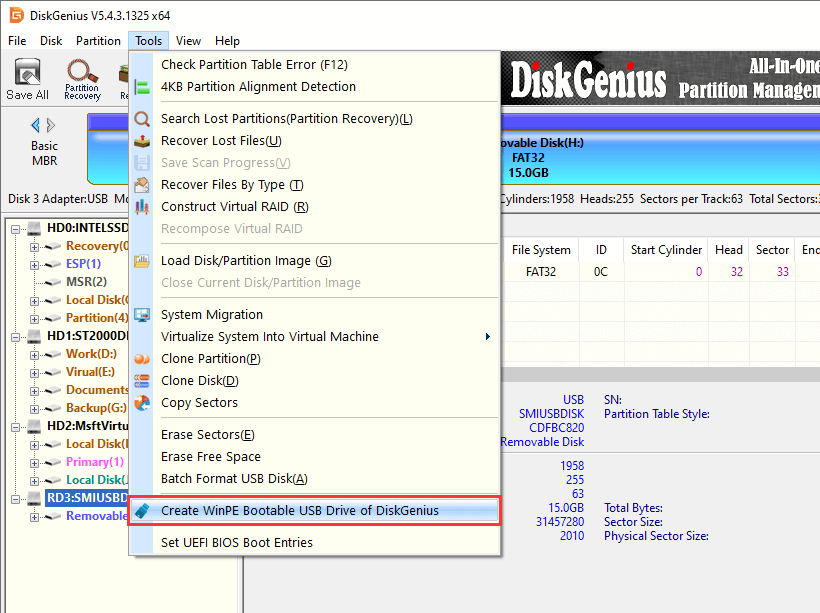
• Click the Tools menu, then select Create WinPE Bootable USB Drive of DiskGenius.
• In the pop-up window, select your USB drive and click OK.
Step 3: Complete & Verify
• DiskGenius will build the WinPE environment and copy tools to the USB (takes 1–2 minutes).
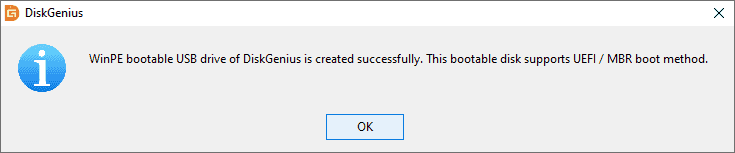
• A "Success" message will appear—click OK to finish.
• To test: Restart a PC, enter BIOS/UEFI, set the USB as the first boot option, and boot into WinPE—DiskGenius will launch automatically.
1. Home Users: Recover Data & Fix Crashed PCs
A bad Windows update renders your PC unbootable? Plug in the DiskGenius USB, boot into WinPE, and recover family photos, documents, and desktop files—then repair the system partition or restore a backup. No expensive repairs needed.
2. PC Enthusiasts: Migrate Windows & Optimize Partitions
Upgrading to a new SSD? Use the bootable USB to clone your HDD to the SSD, migrate Windows, and align partitions for optimal SSD performance—all without booting the old system. It also fixes "low C-disk space" errors by safely resizing partitions.
3. IT Professionals: Recover Server Data & Manage RAID
For businesses, the DiskGenius bootable USB is a must-have. It recovers lost server partitions, manages RAID arrays, restores data from formatted drives, and deploys system images across workstations—all from a single portable USB.
DiskGenius vs. Competitors: Why It's the Best Choice in 2026
The market offers many recovery USB tools, but DiskGenius stands out with unbeatable value:
• Rufus: Only for OS installation; no data recovery or partition tools.
• EaseUS Partition Master: Splits partition management and recovery into separate paid tools; expensive for full features.
• MiniTool Partition Wizard: Free version has limited recovery; bootable USB requires a paid upgrade.
• Windows Recovery Drive: Requires large USB space; lacks advanced recovery; fails with UEFI systems.
DiskGenius Unique Selling Points:
✅ All-in-One: Bootable USB + data recovery + partition management + backup/cloning in one free app.
✅ No Data Loss: Create USB without formatting; safe for existing files.
✅ High Success Rate: Recovers data other tools miss (lost partitions, RAW drives, BitLocker).
✅ Clean & Lightweight: No ads, no bloatware; official download only.
A bootable USB for recovery is the most important insurance policy for your PC. It protects your data, saves you from system crashes, and eliminates the stress of data loss. In 2026, DiskGenius is the only tool that combines one-click USB creation, powerful recovery features, and full system maintenance—all for free.
Don't wait until your PC crashes. Download DiskGenius now, create your bootable recovery USB in 2 minutes, and gain peace of mind knowing you can fix almost any disk or system issue—anytime, anywhere.
DiskGenius is a one-stop solution to recover lost data, manage partitions, and back up data in Windows.
Download

 Facebook
 YouTube
 X
X